How to Build an AI Agent in 10 Minutes with Claude
Turn a repetitive task into a useful AI workflow. Start with one clear goal, give Claude the right context and tools, test it with real examples, then improve and reuse it.
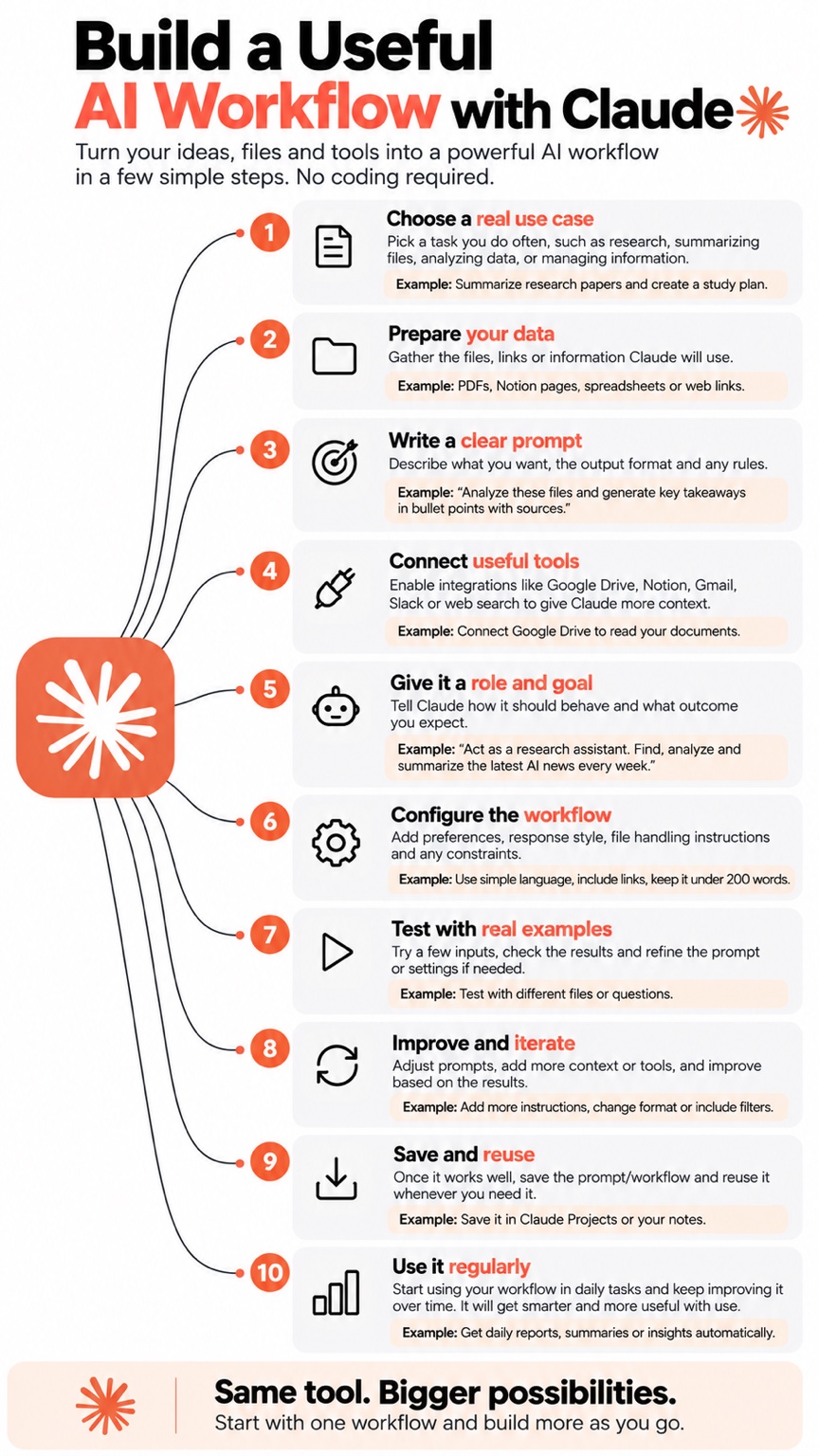
Workflow inspiration: choose a use case, prepare context, write instructions, connect tools, test, iterate and reuse.
First, understand the idea
What are we building?
An AI agent is a system that uses a model to pursue a goal and, when configured, chooses from approved tools to take steps toward that goal. For this quick start, build a small research assistant workflow: it accepts a topic, produces a concise summary and a list of follow-up questions, and returns a consistent format.
10-minute prototype
Use Claude chat or Claude Projects to define the role, provide context and test a repeatable workflow. No code is required for this version.
Agent with actions
For an agent that actually calls APIs, reads files or executes actions, use Claude Code or build with the Claude API and explicitly configured tools. Keep permissions narrow.
Note: the ten-minute target is for a working prototype, not a production-ready autonomous system. Tool access, external integrations and deployment can take longer.
The 10-minute plan
Build it in 10 simple steps
01 · Minute 1 Choose one real use case
Pick a frequent, low-risk task such as summarizing research, preparing meeting notes, reviewing documents or drafting weekly updates. Define what a good result looks like.
02 · Minute 2 Gather the context
Collect the files, links, sample inputs and background information Claude is allowed to use. Remove confidential information you do not need to share.
03 · Minute 3 Give it a role and goal
Specify the agent’s role, the task, audience, boundaries and expected output. Tell it to ask questions when critical information is missing.
04 · Minute 4 Define a repeatable process
Ask Claude to follow a short sequence: inspect the input, identify key facts, reason only from available evidence, draft the result and check it against your requirements.
05 · Minute 5 Choose the output format
Request headings, bullets, a table, citations or JSON as needed. State length limits and how uncertainty should be reported.
06 · Minute 6 Add approved tools if needed
Use available Claude integrations or Claude Code tools for tasks that need files or external actions. Connect only the services required and grant the least permissions possible. A prompt alone does not create an integration.
07 · Minute 7 Run a real example
Give it a representative input and check whether the answer is accurate, relevant and in the requested format.
08 · Minute 8 Test a tricky case
Try missing information, contradictory instructions or an irrelevant file. The agent should say what it cannot determine rather than inventing facts.
09 · Minute 9 Improve the instructions
Fix the biggest failure by adding context, a clearer rule, an example or a verification step. Change one thing at a time.
10 · Minute 10 Save and reuse
Save the instructions in a Claude Project or your notes, record a successful test case and rerun it whenever the task recurs.
Copy and customize
Starter prompt for Claude
Replace the bracketed details with your own task. Paste this into Claude and refine it using real examples.
Act as my focused AI workflow assistant for [TASK].

GOAL
Produce [DESIRED OUTCOME] for [TARGET AUDIENCE] using the context and files I provide.

PROCESS
1. Confirm the goal and identify any essential missing information.
2. Review the supplied context. Separate facts from assumptions and do not invent sources or details.
3. Complete the task in clear, ordered steps.
4. Verify the result against the requirements before responding.
5. If a tool or external action is needed but unavailable, explain the limitation instead of pretending it was completed.

RULES
- Use a [TONE] tone and keep the result within [LENGTH] unless the task needs more detail.
- Respect privacy and do not expose secrets or unnecessary personal data.
- Ask for approval before sending messages, changing files, making purchases or taking other consequential actions.
- State uncertainty and cite the supplied sources when possible.

OUTPUT FORMAT
1. Short result
2. Key findings or actions
3. Assumptions / uncertainties
4. Recommended next step

Start by asking me only the essential questions needed to configure this workflow.
Tools and safety
When should you connect tools?
Start without integrations. Add a tool only when the workflow needs to retrieve information or perform an action that Claude cannot do from the conversation alone. Depending on your setup, that may mean connected apps in Claude, Claude Code tools, or API tool-use functions you implement yourself.
- Read-only first: begin with searching or reading files before enabling write access.
- Human approval: confirm before sending, deleting, publishing or modifying important data.
- Protect secrets: never paste API keys into public prompts, screenshots or repositories; use environment variables or a secrets manager for code projects.
- Validate output: check factual claims, citations and any structured output before using it.
- Keep logs: record inputs, outputs, failures and costs if you turn the prototype into an application.
After the 10-minute prototype
Turn the experiment into a stronger AI engineering project by adding a small test set, measurable success criteria, error handling, bounded tool permissions, human review and a clear README. If you need a true application, build a backend around the model and test it outside the chat interface.
Remember
The goal is not to make the most autonomous agent possible. The goal is to make the smallest reliable workflow that solves a real problem.